These are some useful apps for your trip to South Korea.

NAVER Maps
Google Maps doesn't work so well in South Korea, so the Naver Maps app is essential for holiday planning and day-to-day navigation.
It provides route planning, turn-by-turn navigation, bus and metro timetables, along with information about points of interest, food outlets, shops, and much more. You can bookmark favourite locations, organise them into lists, and save routes.
It also provides 'panorama view', equivalent to Google 'street view', which allows you to explore routes and locations ahead of your visit.
NAVER Maps provides good support for English making it easy to operate.
Holiday planning with the app really comes into its own if you sign up for a NAVER account. This allows you to share and manage favourites and lists across devices including iPads and Macs with Apple Silicon. Planning and organising my places of interest using a desktop computer and a large screen, then seeing the results in NAVER Maps on my iPhone worked really well.
Signing up for a NAVER account was a bit tricky however, as the process is almost all in Korean!

KakaoTalk
WhatsApp is of course ubiquitous around the world and South Korea is no exception.
If you're not already on WhatsApp and don't want to sign up to Meta, the 'super app' KakaoTalk is a great option. It is the most popular messaging app in South Korea, making it ideal for connecting with local transportation coordinators, tour guides, and airport drivers.
You can sign up to KakaoTalk using the full international telephone number of your mobile phone, for example, +44 XXXX XXXXXX

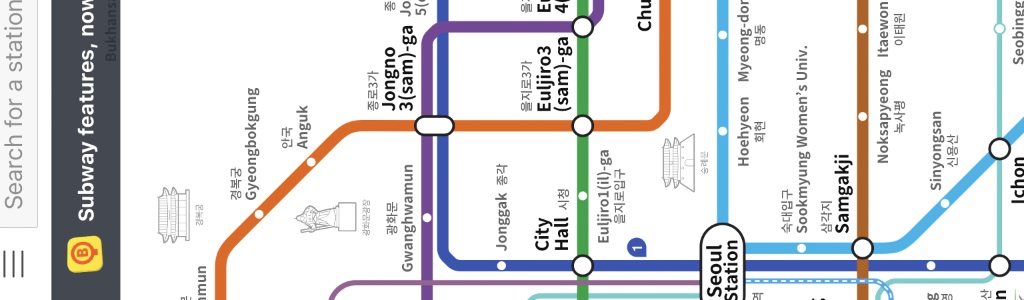
KakaoMetro
NAVER Maps provides a metro feature, but KakaoMetro has the benefit of being dedicated to that purpose.
Point at your start and destination stations and KakaoMetro will provide route and any connections needed, along with times and prices.

Apple Translate
English, Japanese, and Chinese translations are common in museums and other tourist locations. These languages are also present in announcements on the metro and audio commentaries in museums. Road signs, place names, and metro stations all have the romanised version below the Korean or Hangul letters. If you can recognise your important street and station names using latin characters, you are good to go!
In museums however, not everything is translated.
While a display cabinet will usually have an English translation broadly describing its contents, information cards for individual items only get an English title. The remainder of the card is usually in Korean. This is where translation apps can really help!
Tip: Download the English and Korean languages into Translate for offline operation!

NAVER Papago
This translation app provides bi-directional English to Korean translations both typed and through your phone's microphone.
It provides good support for English, making it straightforward to use.

Airalo
The number of restrictions and strict procedures around getting a voice number in Korea mean that a data eSim is the only realistic option when visiting.
While you won't be able to make normal phone calls, internet based services and messaging apps (such as KakaoTalk) work fine.
Airalo provide a range of data plans of varying length and quota, with the option of topping up if needed.

NAVER
The NAVER App is an all-in-one app that provides a wide range of services including email, news, social media, and much more.
Like NAVER Maps, this app will also run on macOS with Apple Silicon.
It's main value for me has been to manage the NAVER account I created to enhance my experience with NAVER Maps.
It uses Korean throughout, so useful for forcing you to learn Korean, but making it quite tricky to use without translation tools!
If you do sign up for a NAVER account, remember to sign into the NAVER App periodically to keep the account active.